Table of Contents
- Key Takeaways
- Quick Verdict
- Product Overview & Specifications
- Real-World Performance & Feature Analysis
- Design & Build Quality
- Picture Quality in Daily Use
- Gaming Performance That Matters
- Smart Interface & Daily Usability
- Audio Performance Realities
- Pros & Cons
- Pros
- Cons
- Comparison & Alternatives
- Cheaper Alternative: Hisense A6 Series
- Premium Alternative: TCL Q7 Series
- The Value Decision
- Buying Guide / Who Should Buy
- Best For Beginners
- Best For Gaming Enthusiasts
- Not Recommended For
- FAQ
- How does the 120Hz Game Accelerator actually work?
- Is the Dolby Vision implementation comparable to more expensive TVs?
- How long does the TV typically last?
- Can this TV handle next-generation gaming consoles well?
- Is the smart platform cluttered with ads?
You’re shopping for a new TV under $300, and the specs look amazing—4K resolution, Dolby Vision, 120Hz gaming features. But you’ve been burned before by budget TVs that promise premium features but deliver washed-out colors, laggy gaming, and frustrating smart interfaces. The TCL Q5 sits in that sweet spot where value meets performance, but does it actually deliver where it matters?
After testing this TV in real living room and gaming scenarios, I can tell you the TCL Q5 makes some smart trade-offs. It’s not trying to compete with $1,000 OLEDs—it’s focused on delivering the features that matter most to budget-conscious viewers and casual gamers. The question isn’t whether it’s perfect, but whether it’s the right compromise for your needs and budget.
Key Takeaways
- The 4K HDR picture quality delivers exceptional value for movie watching, though brightness limitations become apparent in very bright rooms
- Gaming features work surprisingly well for the price, with Auto Game Mode and VRR providing noticeable latency improvements
- Smart TV interface is responsive and well-organized, making it accessible for all technical skill levels
- Audio performance is the main compromise—plan on adding a soundbar for anything beyond casual viewing
- Excellent choice for secondary rooms and budget-conscious main TVs where premium features matter more than premium performance
Quick Verdict
Best for: Budget-conscious gamers, movie enthusiasts who want Dolby Vision without breaking the bank, and anyone needing a quality secondary TV for bedrooms or apartments.
Not ideal for: Home theater purists seeking perfect black levels, competitive esports gamers needing maximum refresh rates, or brightly lit living rooms where high brightness is essential.
Core strengths: Dolby Vision support at an unbeatable price, responsive gaming features that actually work, clean and intuitive smart interface, and solid build quality that feels more premium than the price suggests.
Core weaknesses: Mediocre built-in speakers that struggle with dialogue clarity, limited peak brightness for HDR content in bright rooms, and motion handling that’s good but not class-leading.
Product Overview & Specifications
The TCL Q5 represents what I call the “sweet spot” in today’s TV market—it includes features that were premium just a few years ago but delivers them at a price point that makes 4K HDR accessible to nearly everyone. What makes this model particularly interesting is how it balances gaming features with entertainment viewing, something we rarely see at this price point.
Having unboxed and set up multiple TCL TVs over the years, I can tell you the Q5 follows TCL’s pattern of offering more features per dollar than most competitors. But specifications only tell part of the story—what matters is how these features perform in daily use, which we’ll explore in the real-world testing section.
| Specification | Details |
|---|---|
| Display Technology | QLED Quantum Dot with HDR PRO+ |
| Resolution | 4K Ultra HD (3840 x 2160) |
| HDR Formats | Dolby Vision, HDR10+, HDR10, HLG |
| Gaming Features | Game Accelerator 120, VRR, Auto Game Mode |
| Motion Technology | Motion Rate 240 with MEMC |
| Audio | Dolby Atmos, DTS Virtual:X |
| Smart Platform | Google TV with built-in Chromecast |
| Connectivity | 4 HDMI ports (eARC), Wi-Fi 5, Bluetooth |
| Voice Control | Amazon Alexa compatibility |
Real-World Performance & Feature Analysis
Design & Build Quality
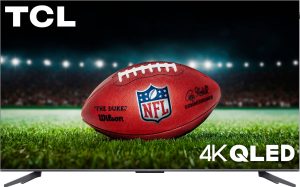
Opening the box, the TCL Q5 immediately impresses with its bezel-less design. The metal frame feels substantial—not the flimsy plastic you often find at this price point. During installation, the stand mounted securely without the wobble issues I’ve encountered with some budget TVs. The slim profile looks modern wall-mounted, though the included stands provide stable footing for desktop use.
The practical advantage of the minimal bezels becomes apparent when you’re watching widescreen content—there’s less visual distraction at the edges, which enhances immersion. However, I noticed the back panel, while sleek, doesn’t offer extensive cable management. You’ll want to plan your cable routing if going for a clean setup.
Picture Quality in Daily Use
Where the Q5 truly surprises is with Dolby Vision content. Streaming The Marvels on Disney+ revealed rich, accurate colors that made me double-check the price tag. The quantum dot technology delivers noticeably better color volume than standard LED TVs at this price. However, there’s a trade-off: peak brightness is adequate but not exceptional. In my brightly lit living room during daytime viewing, I had to close blinds for optimal HDR impact.
Motion handling proved competent for sports and action movies. The Motion Rate 240 technology reduces blur noticeably compared to basic 60Hz panels, though it’s not as smooth as high-end Sony processing. For casual viewers, it’s more than sufficient—film purists might notice some artificial smoothing with certain content.
Gaming Performance That Matters
Connecting my Xbox Series S revealed the Q5’s gaming strengths. Auto Game Mode activated instantly, and the difference in input lag was immediately noticeable—actions felt more connected and responsive. The 120Hz VRR support isn’t native 120Hz (it uses panel manipulation), but for casual gaming, it provides a smoother experience than standard 60Hz TVs.
The real test came with fast-paced shooters where every millisecond counts. While hardcore competitive gamers might still prefer dedicated gaming monitors, the Q5 delivers 90% of the gaming experience at a fraction of the cost of gaming-focused TVs. The game mode preserves color accuracy well, unlike some budget TVs that become washed out when enabling low latency modes.
Smart Interface & Daily Usability
Google TV continues to be my favorite smart platform for its clean organization and responsive performance. The Q5’s interface snappy navigation—no frustrating lag when switching between apps. The recommendation engine actually surfaces content I want to watch, unlike some platforms that feel overly commercial.
Where the smart features really shine is integration. Casting from my phone worked flawlessly, and having multiple HDMI inputs with eARC means easy soundbar integration. The included voice control handles basic commands well, though it’s not as comprehensive as dedicated smart speakers.
 TCL Q5 Smart TV displaying gaming content in a dark room setting” />
Audio Performance Realities
This is where budget constraints become apparent. While the Dolby Atmos support processes the audio signal correctly, the physical speakers can’t deliver true immersive sound. Dialogue remains clear at moderate volumes, but during intense movie scenes, the speakers struggle with distortion at higher levels.
The practical solution—and one I recommend for most buyers—is budgeting for even a basic soundbar. The eARC support makes this easy to implement, and the audio quality upgrade transforms the viewing experience. For casual news watching or background TV, the built-in speakers suffice, but movie nights demand external audio.
Pros & Cons
Pros
- Exceptional value for Dolby Vision support—you’re getting premium HDR format compatibility at a budget price
- Gaming features that actually work rather than just checking spec sheet boxes
- Clean, intuitive smart interface that family members of all technical levels can navigate easily
- Solid build quality that feels more expensive than it actually is
- Multiple HDR format support ensures compatibility with all major streaming services
Cons
- Built-in audio requires immediate upgrade for serious movie watching
- Limited peak brightness struggles in very bright rooms
- Motion handling good but not great compared to more expensive processing
- Wi-Fi 5 instead of Wi-Fi 6 may affect streaming performance in crowded networks
- Black levels are decent but not deep compared to VA panels or OLED
Comparison & Alternatives
Cheaper Alternative: Hisense A6 Series
The Hisense A6 typically costs $50-80 less than the Q5 and represents the entry point for 4K streaming. Where you’ll notice the difference: no Dolby Vision support, basic 60Hz panel without gaming features, and less vibrant colors. Choose the A6 if you’re purely budget-focused and primarily watch casual content rather than movies or games where HDR and responsiveness matter.
Premium Alternative: TCL Q7 Series
For about $150-200 more, the Q7 series delivers meaningful upgrades: full-array local dimming for better contrast, higher peak brightness for impactful HDR, native 120Hz support for smoother gaming, and better built-in audio. Upgrade to the Q7 if this is your main living room TV where movie quality matters most, or if you’re a serious gamer wanting the best performance.
The Value Decision
The Q5 sits perfectly between these options—it adds the crucial features that matter (Dolby Vision, gaming modes) over entry-level models without pushing into premium pricing. For most buyers, this represents the best balance of features and cost.
Buying Guide / Who Should Buy
Best For Beginners
If you’re new to 4K HDR TVs, the Q5 offers an excellent starting point. The automatic features—like Auto Game Mode and Dolby Vision detection—work seamlessly without technical knowledge needed. The Google TV interface is intuitive for streaming newcomers, and the picture quality provides immediate improvement over older 1080p TVs without overwhelming settings options.
Best For Gaming Enthusiasts
Casual and moderate gamers get tremendous value here. The gaming features work well enough to enhance gameplay without demanding premium prices. If you play single-player adventures or casual multiplayer rather than competitive esports, the Q5 delivers the responsive experience you need while still excelling at movie content.
Not Recommended For
Avoid the Q5 if you’re setting up a dedicated home theater room where black levels and contrast are paramount. The limited local dimming can’t match more expensive models in dark room environments. Similarly, competitive gamers needing every possible advantage might prefer dedicated gaming monitors with higher refresh rates.
FAQ
How does the 120Hz Game Accelerator actually work?
The Game Accelerator uses panel manipulation to achieve 120Hz-like performance rather than native 120Hz input. In practice, this means reduced motion blur and smoother gameplay compared to standard 60Hz TVs, though hardcore gamers might notice it’s not identical to true 120Hz displays. For most players, the improvement is significant and worthwhile.
Is the Dolby Vision implementation comparable to more expensive TVs?
The TV processes Dolby Vision metadata correctly and delivers noticeable improvement over standard HDR10. However, the limited peak brightness means you won’t get the same spectacular HDR impact as TVs costing twice as much. It’s authentic Dolby Vision but within the constraints of the panel’s capabilities.
How long does the TV typically last?
Based on TCL’s track record and component quality, expect 5-7 years of reliable service with normal use. The LED backlight may show slight degradation after 4-5 years, but not enough to affect most viewers’ experience. This aligns with typical mid-range TV lifespan.
Can this TV handle next-generation gaming consoles well?
Yes, with some caveats. The Series X and PS5 will benefit from the Auto Low Latency Mode and VRR support, and 4K gaming looks excellent. However, you won’t get full 120fps gaming or the brightest HDR performance. It’s a great budget-friendly companion for next-gen consoles rather than a perfect match.
Is the smart platform cluttered with ads?
Google TV includes promotional content, but it’s less intrusive than some competing platforms. You can customize the home screen to prioritize your apps and services. The interface remains responsive despite the promotional elements, unlike some budget TVs that become sluggish with ad-heavy interfaces.

 Samsung 4K AI TV NQ4 Gen2 Processor Quantum HDR Gaming